Learn how to identify and avoid credit card cloning

It’s a sinking feeling that is all too common: you’re checking your credit card statement, and you spot a charge you know you didn’t make. Maybe it’s a $2.50 charge from a company you’ve never heard of, or a $500 charge for electronics in a state you’ve never visited.
You’ve just become a victim of credit card fraud.
While “stolen” is a broad term, one of the most invasive and historically common forms of this theft is credit card cloning. This is the high-tech equivalent of counterfeiting, where criminals create a physical, working copy of your card to go on a shopping spree at your expense.
As technology has evolved, so have the thieves. Their methods have split, moving from physical “cloning” to digital “stealing.” The good news? The technology in your pocket—like EMV chips and digital wallets—has evolved, too. Your best defense is knowing what you’re up against.
In this comprehensive guide, we’ll break down how to identify the new and old-school threats, the concrete steps to prevent them, and the exact action plan to follow if the worst happens.
What Is Credit Card Cloning (And How Is It Different from “Stolen”)?

In the world of financial fraud, words matter. You’ll hear “cloned,” “skimmed,” and “stolen” used interchangeably, but they often refer to two different types of crime.
- Credit Card Cloning (or “Skimming”): This is a physical crime. The goal is to duplicate your physical card’s magnetic stripe. Thieves use a device called a “skimmer” to read and copy the data from your stripe. They then write this data onto a new, blank card. With this “cloned” card, they can physically walk into a store and swipe it to make purchases. This is a “Card-Present” fraud.
- Card-Not-Present (CNP) Theft: This is a digital crime. The goal is to steal your card information—the 16-digit number, the expiration date, and the 3-digit CVV code from the back. Thieves get this information through data breaches, phishing emails, or unsecured websites. They then use this info to make purchases online or over the phone. They don’t need a physical card at all.
This guide will teach you how to defend against both threats, starting with the classic “cloning” method.
The Rise of Skimmers: How Physical Card Cloning Works
The primary tool for card cloning is a “skimmer.” This is a small, malicious device designed to fit perfectly over a real, legitimate card reader. Criminals place these on the two most vulnerable targets: ATMs and gas station pumps.
A typical skimming attack has two parts:
- The Skimmer: This device slides over the real card slot and reads your magnetic stripe data the moment you insert your card. The data is either stored to be collected later or, in more advanced models, transmitted wirelessly via Bluetooth to a nearby thief.
- The PIN Catcher: Stealing the stripe data isn’t enough; they also need your PIN. They capture this in one of two ways:
- A Tiny, Hidden Camera: A small pinhole camera is strategically placed on the machine (or in a nearby flyer holder, or even on the skimmer device itself) to record you typing in your PIN.
- A Keypad Overlay: This is a fake, thin keypad that fits directly on top of the real one. When you press the keys, the overlay records your PIN while the real keypad below still processes your transaction.
The entire process is seamless. Your transaction is approved, you get your cash or your gas, and you walk away, completely unaware that your card data and PIN have just been harvested.
How to Spot a Credit Card Skimmer in the Wild
This is where your vigilance is your greatest weapon. Before you insert your card, take five seconds to perform these checks.
The “Wiggle, Pull, and Tug” Method
This is the golden rule. Legitimate card readers and keypads are built to be robust and are firmly attached to the machine. Skimming devices, on the other hand, are designed to be placed and removed quickly, so they are often just taped or snapped on.
- Wiggle the Card Reader: Grab the card slot with your fingers and give it a firm jiggle. Does it feel loose? Does it move? Does it look like a separate piece that doesn’t quite match the rest of the machine?
- Pull on the Keypad: Is it a keypad overlay? See if you can lift it at the edges. Does it feel “spongy” or thicker than usual?
- If anything feels loose, mismatched, or “off,” do not use it. Go to a different machine.
Look for Mismatched Components
Thieves aren’t perfect manufacturers. Look for signs that something doesn’t belong.
- Mismatched Plastic or Colors: Does the card reader’s plastic look newer, a different shade, or a different texture than the rest of the machine?
- Odd Graphics: Are the “insert card here” arrows or logos slightly different, or are the stickers peeling?
- Bulky or Strange Protrusions: Does the card slot stick out further than it should? Is there a strange box or panel nearby that could hide a camera?
Always, Always Cover Your PIN
This one simple habit defeats half of the entire skimming attack. Even if the skimmer successfully copies your stripe, it’s useless for ATM cash withdrawals without your PIN.
When you type your PIN, use your other hand as a shield to block the view from any potential pinhole camera. Make it a reflex, every single time.
Trust Your Gut and Choose Safer Locations
- Trust Your Gut: If a machine looks suspicious, don’t risk it. It’s better to be inconvenienced for five minutes than to spend five hours cleaning up fraud.
- Choose ATMs Inside Banks: The safest ATMs are those in the bank’s lobby. They are under constant video surveillance and are much harder for criminals to tamper with.
- At Gas Stations, Pay Inside: The safest option is to skip the pump reader entirely and pay the cashier inside. If you must pay at the pump, try to use the pumps closest to the well-lit entrance, as thieves prefer the darker, more remote pumps.
The Digital Threat: How Fraudsters Steal Your Card Info Online (CNP Fraud)
While physical skimming is still a problem, thieves have largely shifted their focus to the more scalable and anonymous “Card-Not-Present” (CNP) fraud. Here’s how they get your data without ever seeing your card.
Phishing, Smishing, and Vishing
This is fraud based on deception.
- Phishing: You get a legitimate-looking email from “Amazon,” “Netflix,” or your “bank,” claiming “Your Account is Locked” or “A Suspicious Charge Was Detected.” It urges you to click a link and “verify” your identity by entering your card details. The link goes to a fake, look-alike website, and you just handed the thieves your info.
- Smishing: The same attack, but it comes via SMS text message.
- Vishing: The same attack, but it comes via a voice call (e.g., a robocall about your “auto warranty” that ends with them asking for a card to “hold your file”).
Rule #1: Never click a link in an unsolicited email or text about your financial accounts. Go directly to the official website or app and log in yourself. Never give your card number on a phone call you did not initiate.
Data Breaches
This is the one you can’t control. A major retailer you shop at (like Target, Home Depot, or any online store) gets hacked, and their entire customer database, including saved credit card numbers, is stolen. Your information is then sold in bulk on the dark web.
Unsecured E-commerce Sites
When you buy something online, you must check the URL bar.
- HTTPS: The “S” stands for “Secure.” You should also see a padlock icon. This means the connection between your browser and the website is encrypted, and your card data cannot be easily intercepted.
- HTTP: No “S,” no padlock. This is an unsecured connection. Never, ever enter your credit card information on an “http://” site.
Public Wi-Fi Dangers
Using free, public Wi-Fi (at a café, airport, or hotel) for financial transactions is incredibly risky. Hackers can set up “evil twin” networks or use “man-in-the-middle” attacks to intercept all the unencrypted data you’re sending—including your card numbers and banking passwords.
Your Best Defense: 7 Proactive Strategies to Prevent Fraud

You can’t stop data breaches, but you can make your own data useless to thieves. Here are the modern defenses you should be using.
1. Embrace the Chip & Tap (NFC)
This is the single biggest security upgrade to physical cards. The EMV chip (the small, metallic square on your card) is exponentially safer than the magnetic stripe.
- Why? When you “dip the chip,” it creates a one-time, unique transaction code. This code is useless for any future transaction.
- Even if a thief could “shim” (a new, thin skimmer for chips) and steal that code, they can’t use it again. It can’t be “cloned” like a magnetic stripe.
- NFC (Tap-to-Pay) is even better. It uses the same one-time-code technology but with no contact.
- Your New Rule: Never swipe your card if you can dip it. Never dip your card if you can tap it.
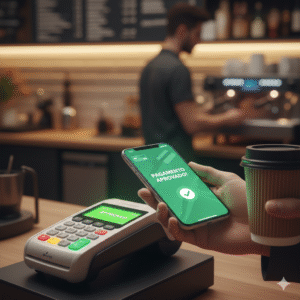
2. Use Digital Wallets (Apple Pay, Google Pay, Samsung Pay)
This is, without a doubt, one of the safest ways to pay. When you add your card to a digital wallet, the service uses a technology called “tokenization.”
- How it works: Your real 16-digit card number is not stored on your phone. It’s replaced with a unique, randomized “token.”
- When you pay, your phone sends that token—not your real card number—to the merchant.
- The Benefit: The merchant never sees or stores your actual card number. Even if that merchant gets hacked in a data breach, the thieves only get a list of useless tokens. This also protects you from physical skimmers.
3. Set Up Real-Time Transaction Alerts
This is the single best detection method. Go into your credit card’s mobile app or website right now and set up alerts to send you a push notification or text message for every single transaction, regardless of the amount.
This turns your phone into an immediate fraud detector. If you get a notification for a charge you didn’t just make, you know instantly that your card is compromised, and you can call your bank in seconds.
4. Practice Smart Digital Hygiene
- 2FA: Use Two-Factor Authentication (2FA) on all your financial accounts.
- Passwords: Use a password manager and create strong, unique passwords for every site.
- VPN: Use a reputable Virtual Private Network (VPN) if you absolutely must use public Wi-Fi. It encrypts your connection, making it invisible to hackers.
- Don’t Save Cards: Avoid “saving” your card on every e-commerce site. It’s convenient, but it just puts your card into one more database that can be breached.
5. Never Let Your Card Out of Your Sight
At a restaurant, when the server brings the bill, don’t let them walk away with your card. Ask them to bring a portable, tableside terminal (common now) or walk with them to the register to pay.
6. Review Your Statements Meticulously
Don’t just glance at the total. Read your statement line by line, every single month. Hackers often start with “micro-charges” (e.g., $0.50 or $1.00) to “test” if the card is active before they go for a large-ticket item. If you spot a tiny charge you don’t recognize, call your bank immediately.
7. Consider Virtual Credit Cards
Many issuers (like Capital One and Citi) offer “virtual card numbers.” You can generate a brand-new, temporary card number from your app that is linked to your real account. You can use this number for a single online purchase and then “lock” or delete it. This is perfect for shopping on a site you don’t fully trust.
I’ve Been Hacked! Your 5-Step Action Plan for After the Fraud
If you spot a fraudulent charge, do not panic. The U.S. has some of the best consumer protection laws in the world. Just act quickly.
Step 1: Immediately Call Your Credit Card Issuer
Do not email. Do not wait. Find the 1-800 customer service number on the back of your physical card (or in your app) and call it. State clearly, “I am calling to report fraudulent charges on my account.”
Step 2: Lock Your Card
While you’re waiting on hold, use your bank’s mobile app. Nearly all of them have a “Lock” or “Freeze” button. This will instantly block all new transactions from being approved, stopping the thief in their tracks.
Step 3: Dispute the Charge(s)
The bank’s fraud department will walk you through the process. They will list the recent charges, you will confirm which ones are fraudulent, and they will open an investigation. They will issue a temporary credit to your account for the disputed amount, so you aren’t out the money while they work.
Step 4: Understand Your $0 Liability (The Law is on Your Side)
This is the most important part for your peace of mind. The Fair Credit Billing Act (FCBA) is a federal law that protects you.
- It states that your maximum liability for fraudulent credit card charges is $50.
- Furthermore, virtually every major card issuer (Visa, Mastercard, Amex, Discover) has voluntarily adopted a “$0 Liability” policy.
- This means you will not lose a single penny as long as you report the fraud in a timely manner.
Step 5: Get a New Card and Change Your Passwords
The bank will immediately cancel your compromised card and mail you a new one with a brand-new 16-digit number, expiration date, and CVV. Once you get it, your final step is to update any “auto-pay” bills (like Netflix or your phone bill) with the new card information. As a precaution, change the password and security questions for your online banking portal.
Vigilance is Your Best Defense
Credit card fraud is a battle of technology and awareness. Thieves will always be inventing new ways to skim and phish, but your defenses are stronger than ever.
By using the security built right into your card (the chip) and your phone (digital wallets), you can neutralize the vast majority of threats. By setting up real-time alerts and knowing how to spot a skimmer, you can catch the rest. And by knowing your $0 liability rights, you can act with speed and confidence, knowing you are protected.